A laptop for email, Word and Excel: the spec you need, and the one you are paying for
Email, Word and Excel run happily on 8GB of RAM, a 256GB SSD and any processor Windows 11 supports - laptops like that were selling for R6 000 to R8 000 on Black Friday deals this week, and the R5 000 "bargain" running Windows 10 is the one to walk past.
In 30 seconds
- For email, Word and Excel, look for 8GB RAM, a 256GB SSD and Windows 11 - anything above that is paying for speed you will not use.
- Skip any laptop still sold with Windows 10 - Microsoft stopped security updates on 14 October 2025, and older processors cannot officially move to Windows 11.
- Laptops that meet the spec were on sale for about R6 000 to R8 000 this week - a R15 000 machine buys a faster processor, not a better spreadsheet.
What email, Word and Excel actually ask of a laptop
Very little. A household budget in Excel, a CV in Word, email and a few browser tabs are some of the lightest jobs a computer does. The specs that make a laptop expensive - a fast processor, a graphics card, a high-resolution screen - matter for gaming, video editing and design work. For office work they mostly sit idle.
What does matter is that the laptop is not starved of memory, that it starts up and opens files quickly, and that it will keep getting security updates for years. That comes down to four things.
The minimum spec worth buying
- Memory (RAM): 8GB. Windows 11 will start on 4GB, but with a browser and Word open at the same time 4GB is slow. 8GB is comfortable; 16GB is a nice-to-have, not a need.
- Storage: a 256GB SSD. An SSD is what makes a cheap laptop feel quick. Avoid "eMMC" storage or a 64GB or 128GB drive - Windows updates alone fill a small drive. 512GB if you keep lots of photos on it.
- Processor: anything Windows 11 officially supports. As a rule of thumb that is Intel 8th generation or newer, or AMD Ryzen 2000 series or newer. A Celeron, Pentium, Athlon, Core i3 or Ryzen 3 is enough for office work.
- Operating system: Windows 11. This is the one not to compromise on - see the next section.
Nice to have, if the price difference is small: a Full HD (1920 x 1080) screen, which makes a spreadsheet much easier on the eyes than 1366 x 768, and a 15.6-inch screen if it mostly lives on a desk.
The trap: a cheap laptop that is out of support
Microsoft ended support for Windows 10 on 14 October 2025 - no more security updates. Windows 11 requires a supported processor, TPM 2.0 and at least 4GB RAM and 64GB storage, and many older laptops do not qualify.
This matters most with refurbished business laptops, which are often excellent value. On 18 November a search on sadeals.co.za showed both kinds side by side:
- R4 999 - a refurbished laptop with a 4th-generation Core i5, 4GB RAM, a 128GB SSD and Windows 10. Cheapest on the page, but the processor is too old for Windows 11, so it will never get security updates again.
- R5 999 - a refurbished laptop with an 8th-generation Core i5, 8GB RAM, a 256GB SSD and Windows 11. R1 000 more, and it meets every line of the spec above.
The R1 000 difference is the cheapest insurance in the whole purchase. A laptop you use for banking and email should be getting security updates.
What the spec costs right now
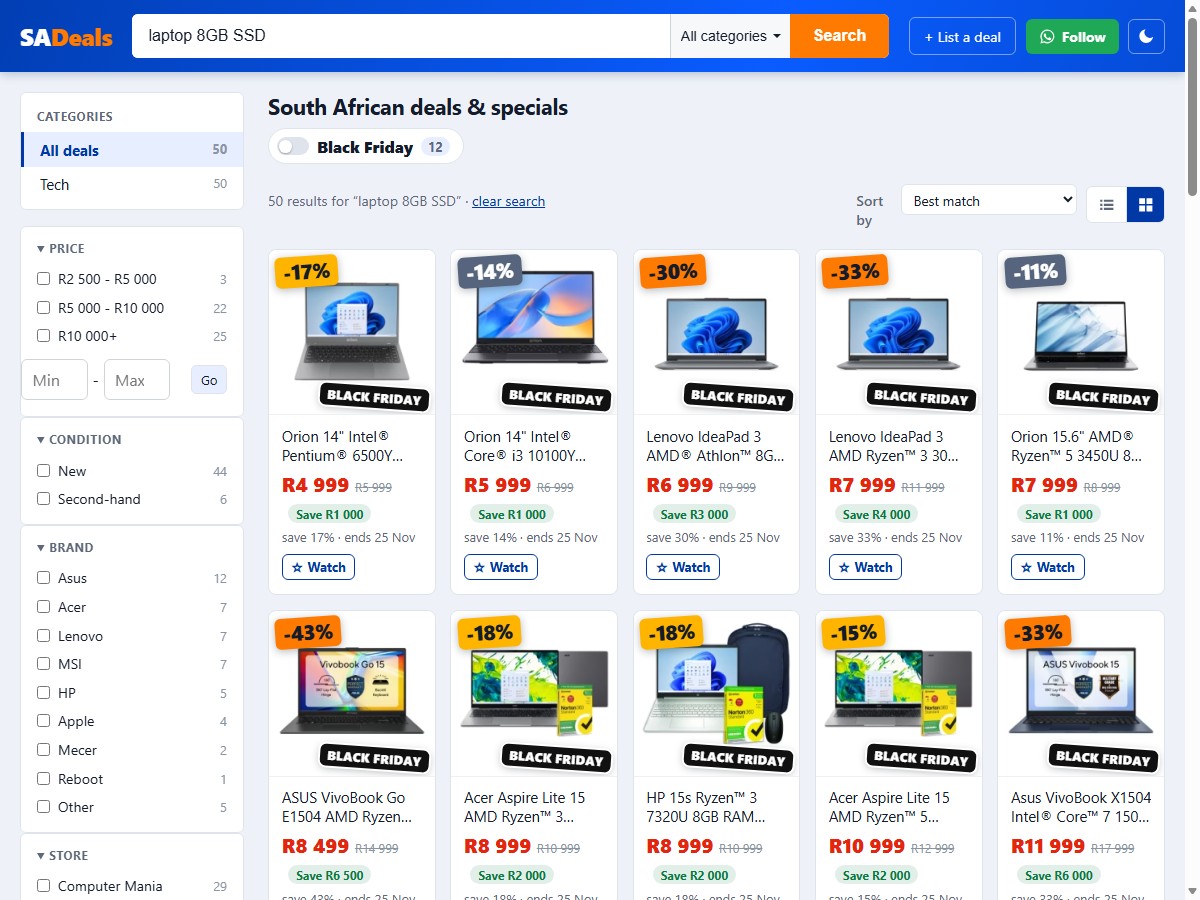
Prices we saw on sadeals.co.za on 18 November 2026, all Black Friday deals ending around 25 November:
- About R5 000 to R6 000 - 8GB RAM, 256GB SSD, Windows 11, with a Pentium, Core i3 or a refurbished 8th-generation Core i5.
- About R6 500 to R7 000 - new laptops with an Athlon or Celeron, 8GB RAM and a 256GB SSD.
- About R8 000 - new laptops with a Ryzen 3 or Ryzen 5, 8GB RAM and a 512GB SSD.
Above that you are paying for performance this kind of work does not need. If the budget allows R10 000 or more, the better use of the extra is usually 16GB RAM, a bigger SSD or a better screen, not a faster processor.
How to search for it
- Put the spec in the search box - "laptop 8GB SSD" filters out most of the 4GB and eMMC machines in one go.
- Tick your price band on the left, so nothing above your ceiling shows up.
- Read the full title before you click - RAM, storage and "Windows 10" or "Windows 11" are usually in it.
- Check the "was" price - a 50% saving on a refurbished laptop is often measured against what it cost new years ago.
You may not need to pay for Office
Microsoft offers free web versions of Word, Excel and Outlook with a free Microsoft account. They run in the browser and handle a budget spreadsheet or a letter without trouble. Try them before adding an Office subscription to the cost of the laptop - you can always subscribe later if you miss a desktop feature.
How MaxWealth helps
If the new laptop is going on a card or store account, the debt payoff planner shows how long it will take to clear at your own rate and repayment, and how much interest it adds to that Black Friday price.
Sources
- Microsoft: Windows 10 end of support - support ended 14 October 2025.
- Microsoft: Windows 11 specifications - minimum 4GB RAM, 64GB storage, TPM 2.0, compatible processor.
- Microsoft: Windows processor requirements - the supported Intel and AMD processor lists.
- Microsoft: free Office on the web - Word, Excel and Outlook in the browser.
- sadeals.co.za laptop deals - prices and specs as displayed on 18 November 2026.
Education, not financial advice. This post explains how the rules and the arithmetic work. It does not recommend any financial product, and your own situation may differ - speak to a registered financial adviser or tax practitioner before you act. Figures were checked against the linked sources on the date above.